For arlanix/notification 1.0.0
Screens and fields
Topic form
| Field | What it does |
|---|---|
| Name | What the topic is about. Unique: a second topic of the same name is refused. Rules list topics by it. |
| Description | For whoever subscribes: what is published to it and when. |
| Delivers | Off mutes the topic: what is published to it is dropped. |
| Subscriptions | On a saved topic: its subscriptions, Add subscription and each row's Edit, which open the subscription form in a panel, and each row's Send test message. |
Topics grid
| Column | Shows |
|---|---|
| Name, Description | As on the form. |
| Delivers | On or Off. |
| Active subscriptions | Subscriptions of the topic that are switched on. |
| Last message | When the last message was published to it. |
| Created, Updated | Under Columns, hidden until chosen. |
Select: Edit, Add subscription (a subscription form on this topic), Publish test message, Delete (with its subscriptions and its rules).
Subscription form
| Field | What it does |
|---|---|
| Name | Who gets it, as the grid and the Message Log show it. |
| Topic | The topic whose messages it gets. |
| Gets | Everything, Warnings and errors or Errors only. |
| Active | Off stops sending to it and keeps its settings. |
| Delivered by | How it is sent: Email, Telegram, Slack or Discord, as installed. |
| Test | How the last delivery went, and Send test message. |
By email:
| Field | What it does |
|---|---|
| One address. For several people, add a subscription for each. |
By Telegram:
| Field | What it does |
|---|---|
| Bot | The store's bot, set up in the settings, or A bot of its own. |
| Bot token | For a bot of its own: its token, stored encrypted and never shown. Empty keeps the stored one. |
| Chat | A chat's number, or a public channel's @username. |
| Find chats | Lists the chats the bot heard from in the last day; one chosen fills in Chat and Chat name. |
| Chat name | What the grid and the Message Log show in place of the number. |
By Slack:
| Field | What it does |
|---|---|
| Webhook URL | The channel's incoming webhook, stored encrypted and never shown. Empty keeps the stored one. |
| Channel | What the grid and the Message Log show, such as #store-alerts. |
By Discord:
| Field | What it does |
|---|---|
| Webhook URL | The channel's webhook, stored encrypted and never shown. Empty keeps the stored one. |
| Channel | What the grid and the Message Log show, such as #store-alerts. |
Subscriptions grid
| Column | Shows |
|---|---|
| Name, Topic, Gets, Active | As on the form. |
| Delivered by | How it is sent, with its icon. |
| Sent to | The email address, the chat's name or the Slack or Discord channel. Never a token or a webhook. |
| Last delivery | Sent, Failed with what was answered, or Nothing sent yet, and when. |
| Created, Updated | Under Columns, hidden until chosen. |
Select: Edit, Send test message, Delete.
Rule form
| Field | What it does |
|---|---|
| Name | What the rule is for, as the grid and the Message Log show it. |
| Event | What it answers: see Events. |
| Topic | Where its message goes. |
| Severity | As the event says, or Info, Warning or Error. |
| Active | Off stops the rule and keeps its settings. |
| Conditions | When it sends: every time with none, or when ALL or ANY of them are met. |
| Subject, Body | The message; empty is the event's own. Fields in braces, as Variables lists them. |
| Add details | On: the event's fields, the topic, the source and the time below the body. Off: the subject and the body alone, and the body has to be written. |
| Variables | The event's fields, the personal ones marked, then the message's own, such as {message.topic}. |
| Try it | Preview shows the message with sample values; Publish test message sends it to the topic. |
Rules grid
| Column | Shows |
|---|---|
| Name, Event, Topic, Severity, Active | As on the form. |
| Last sent | When the rule last published a message. |
| Created, Updated | Under Columns, hidden until chosen. |
Select: Edit, Delete.
Message Log
| Column | Shows |
|---|---|
| Published | When the message was published. |
| Topic | The topic's name when it was published. |
| Severity | Info, Warning or Error. |
| Subject, Source | The message's subject, and who published it: the module, CLI from the command line, or for a rule's message the code of its event, such as sales_order_placed. |
| Rule | The rule that sent it, if one did. |
| Outcome | Sent, On its way, Failed, Skipped or No subscribers, and each delivery under it. |
View in a row opens the message and its deliveries, with Retry now for one that failed or waits to be tried again.
Settings
In Stores > Configuration > Arlanix > Notifications:
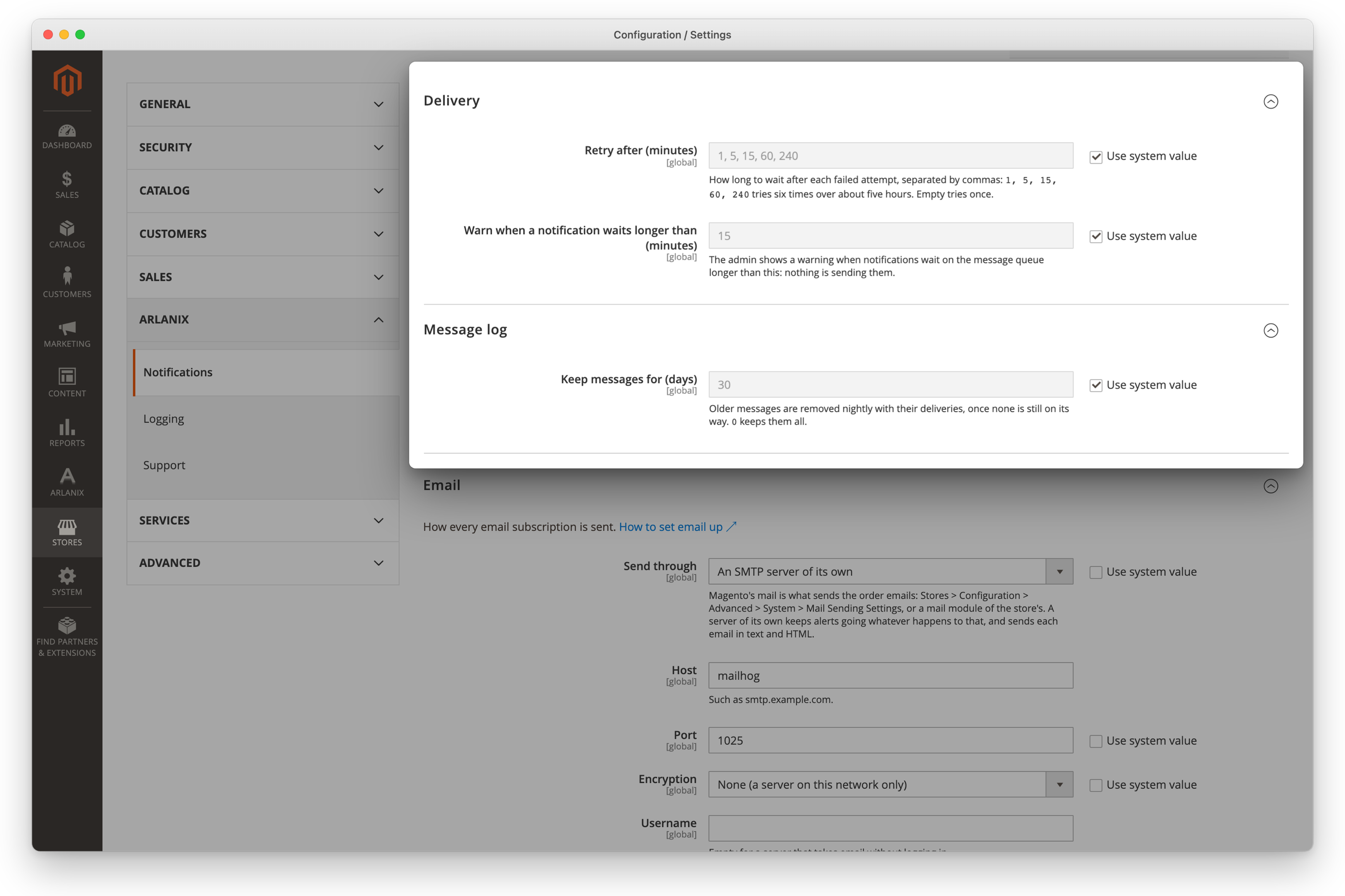
| Setting | Default | What it does |
|---|---|---|
| Delivery > Retry after (minutes) | 1, 5, 15, 60, 240 | How long to wait after each failed attempt. Empty tries once. |
| Delivery > Warn when a notification waits longer than (minutes) | 15 | When the admin warns that nothing is sending. |
| Message log > Keep messages for (days) | 30 | Older messages are removed nightly. 0 keeps them all. |
| Email > Send through | Magento's mail | Or an SMTP server of its own, with its host, port, encryption, login and timeout: see Email. |
| Email > Sender email, Sender name | Who the emails come from. Through Magento's mail, an empty Sender email is the store's General Contact, under its name too. | |
| Telegram > Bot token, Bot API server | The store's bot: see Telegram. | |
| Monitoring | Cron stopped after, Health check key, Application errors from: see Monitoring. | |
| Order flow | Watch the orders, and the numbers Orders stopped goes by, which can differ for each store view: see Monitoring. |