For arlanix/product-feed 1.0.0
Mapping
Mapping connects feed fields to product data. Each row fills one field, such as title from the product name or price from the current price.
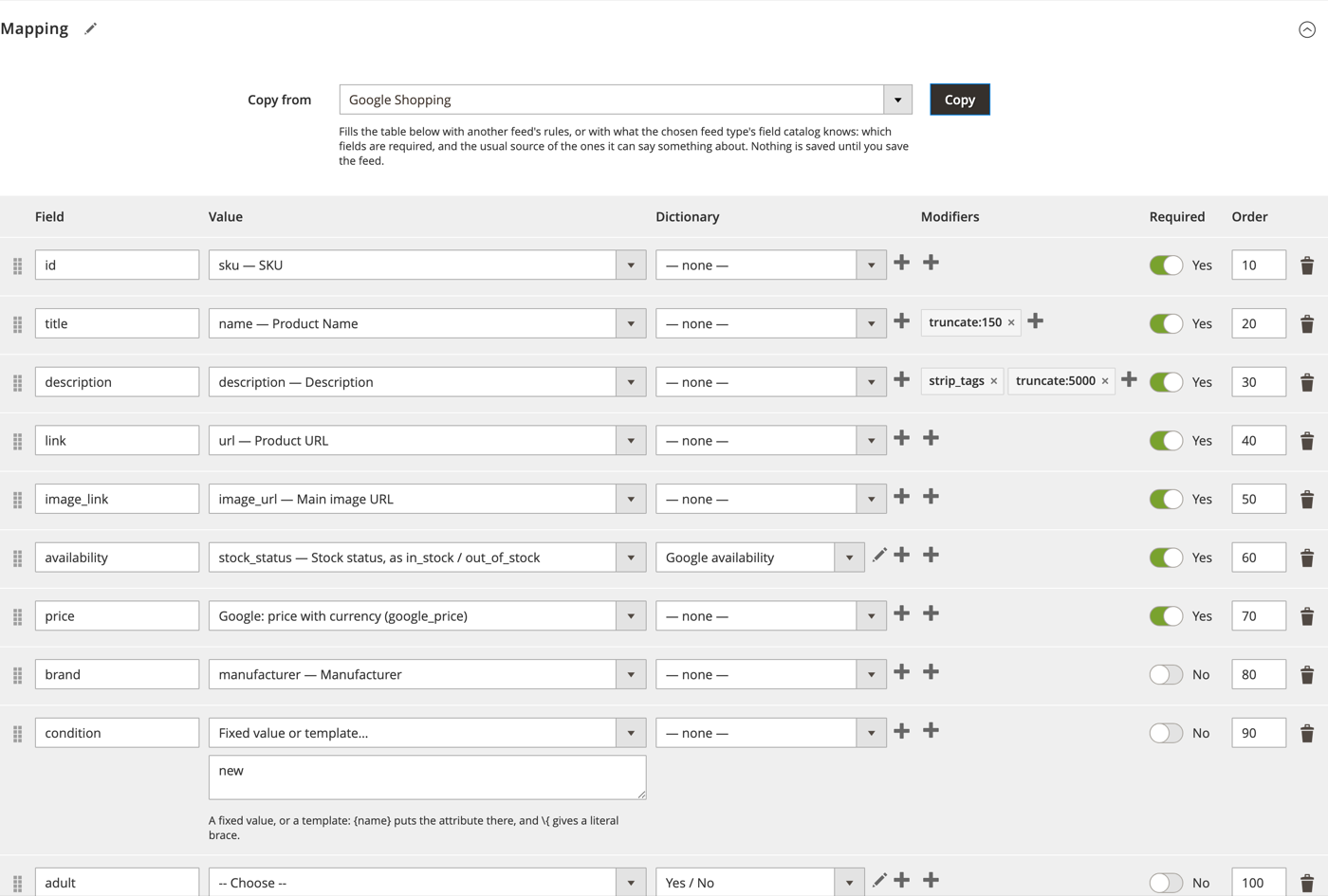
The columns
| Column | What it is |
|---|---|
| Field | The output field name: id, title, price. Use the platform's field names, or your own for a Generic feed. |
| Value | The source of the value. The picker lists product attributes, computed values and Fixed value or template…; see Three kinds of source. |
| Dictionary | A translation table applied after the value is read: see Dictionaries. |
| Modifiers | Small changes made to the value on its way out: cut it, strip HTML, change case. See Modifiers. |
| Required | Excludes a product when this field is empty. Copying a catalog marks the platform's required fields. Clearing it allows an empty value to be sent; the platform may still reject it. |
| Order | The order of the columns in the file. Rows can also be dragged by the handle at the left. |
Use Add field to add a row and × to remove one. Health → Details lists excluded products. If every product is excluded, the feed keeps its previous output by default: see Empty feeds.
Three kinds of source
Open the Value picker on any row. It has three groups.
Attributes
A product attribute such as sku, name, description or color. Select and multiselect attributes return option labels.
- For current stock, use
stock_status,is_in_stockorqty. Magento's Quantity (quantity_and_stock_status) contains saved product data instead of current indexed stock. parent.skuand otherparent.…entries read the configurable parent. Useparent.skuforitem_group_id.urlgives the product page. A hidden variation uses its parent's page with its options selected.
Computed
Values the module works out rather than reads:
- Product URL: the product or parent page, with optional variation selection and tracking parameters such as
utm_source=google&utm_content={sku}. - Image URL and Additional image URLs: a main or other media image, or the remaining gallery. Choose a theme image size or leave it empty for the original.
- Price with currency and Sale price with currency: values such as
34.00 USD. Sale price appears while a special price or catalogue rule reduces the price. - Sale window: the active special price's dates in ISO 8601.
- Google product category: from the feed's Google categories.
- Category path: the deepest Magento category within the store view's root, such as
Women > Tops > Blouses.
A computed source may show an argument under the picker, such as the image size: choose one.
Fixed value or template
Choose Fixed value or template… to enter the same text for every product, such as new for condition. Use curly braces to insert attributes:
{name} in {color}, size {size}
gives Joust Duffle Bag in Blue, size L. \{ gives a literal brace.
Modifiers
A modifier changes a value before output. Press + on a row to add one; multiple modifiers run left to right. Arguments use name:argument. Quote arguments containing :, | or spaces at either end: suffix:' | ', replace:'a:b':ab.
| Modifier | Does |
|---|---|
strip_tags |
Removes HTML, including the contents of <style> and <script> blocks. Included on the copied description row. |
truncate:150, truncate:150:… |
Cuts to a length, on a word boundary. A second argument is put at the end of a cut value, within the length. Google allows 150 characters in a title and 5,000 in a description. |
trim |
Removes spaces from both ends. |
lower, upper, ucfirst |
Lower case, upper case, first letter capitalised. |
prefix:text, suffix:text |
Puts text in front of, or after, the value. |
replace:from:to |
Replaces one piece of text with another. |
default:text |
Uses this text when the value is empty. |
number, number:3, number:2:,:. |
Formats a number. Arguments set decimal places, decimal separator and thousands separator; defaults are 2, . and none. Non-numeric text stays unchanged. |
date:Y-m-d |
Formats a date, PHP date() syntax. Eight digits, such as 20260808, are read as year, month, day. Unreadable or impossible dates, such as 2026-02-30, are left unchanged. |
currency, currency:EUR |
Formats money for the store view's locale, such as $19.90 or 19,90 €. Defaults to its display currency. For Google's 19.90 USD format, keep the copied Price source. |
A multiselect attribute gives a list of labels, and a modifier changes each of them: upper on Red, Blue gives RED, BLUE.
Required and default do not catch non-empty invalid dates. Correct them at the source or use a dictionary.
An unknown modifier is marked on its row and prevents saving.
Dictionaries
A dictionary translates a store's values into a channel's, such as Navy into Blue. On a mapping row, choose it in the Dictionary column; Dictionaries says how to make one and which ones the module installs.
Copy from
Copy from copies another feed's mapping or a field catalog. If rows already exist, choose:
- Replace mine: replace all rows.
- Update mine: keep existing fields and add missing ones.
- Cancel: keep the current mapping.
Save the feed to keep the result.
What the feed type expects
The feed's Type defines fields, length limits and accepted values. Its catalog supplies the initial mapping. Type checks produce warnings; they do not exclude products or block saving. The platform applies its own current rules when it receives the feed.
Missing mapping fields appear above the form. Product warnings appear in Preview and Run history → Details.
A product is excluded only by an empty Required field, an excluding dictionary or a custom row transformer. A warning alone does not exclude it.
Checking a row
Save the feed and press Preview. Check the final values after dictionaries and modifiers before publishing: see Preview a product.