For arlanix/notification 1.1.0
Webhook
A Webhook subscription sends a topic's messages to your own service over HTTPS. Each delivery is one JSON request carrying a digest of up to 25 different messages. A repeated message is one entry with its count. Your developer prepares the receiver; you set up the subscription in the admin.
Ask your developer for the receiver's HTTPS URL, a signing secret and any headers it needs. Send them the webhook developer documentation for the payload and signature checks. The receiver must be reachable directly from the store. A store whose outgoing connections must use an HTTP proxy cannot use the webhook.
1. Subscribe the receiver
Add a subscription on the topic's page or in Subscriptions. See Subscriptions.
Under Delivery, set Delivered by to Webhook.
Paste the Webhook URL. The notice says “HTTPS only. Addresses inside the store's own network are refused.” Put credentials in Headers, rather than in the URL.
Optional: enter the Signing secret agreed with your developer. The notice says “Signs each request with HMAC-SHA256 in the X-Arlanix-Signature header.” Without a secret, the request has no signature headers.
Optional: under Headers, click Add header. Enter its Name and Value. You can add at most 10 headers. The notice says “Sent with every request. Values are stored like the URL and never shown again.”
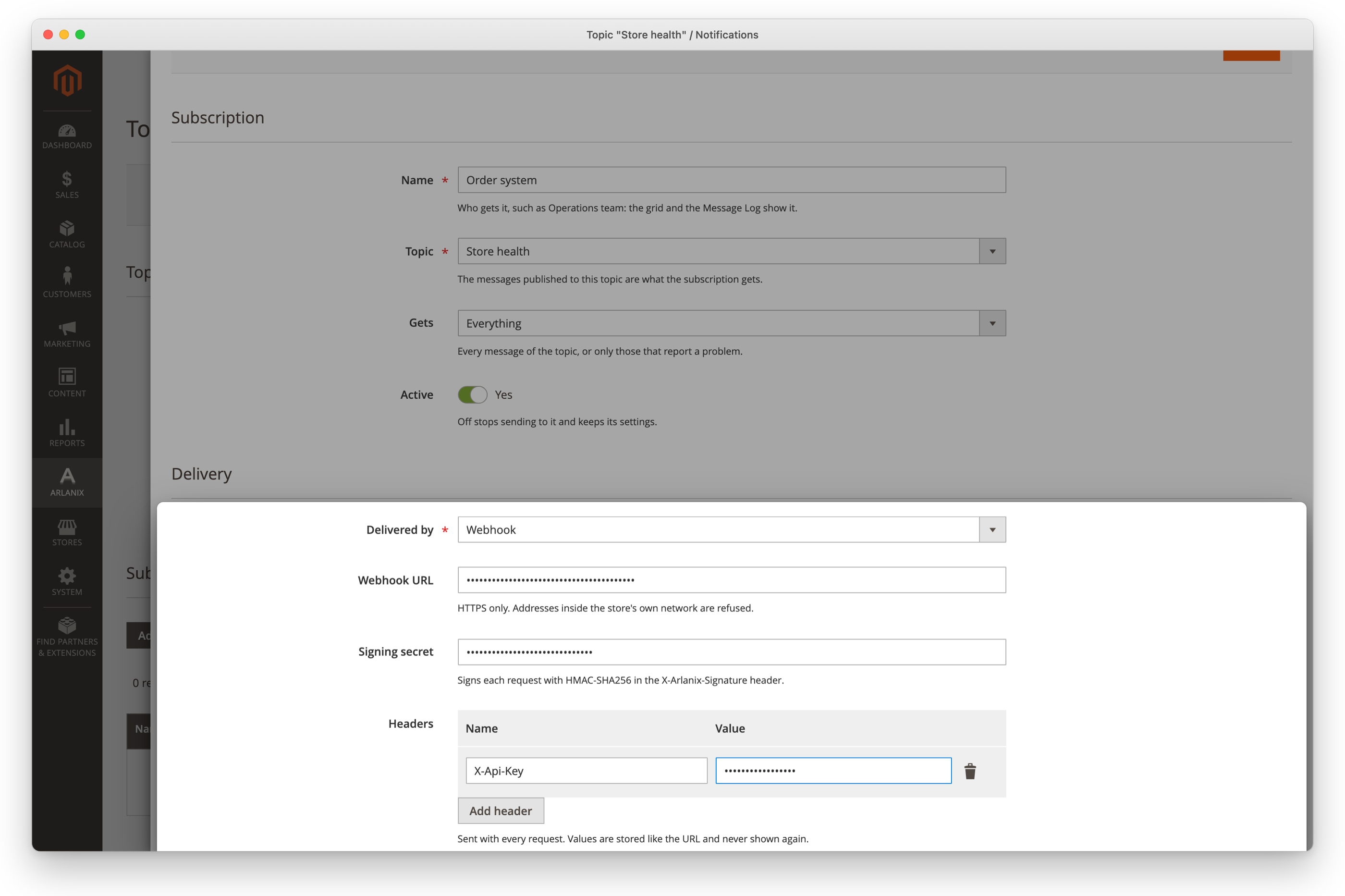
Save the subscription.
Click Send test message. Ask your developer to confirm that the receiver accepts it. Read Last delivery for the result.
The grid and the Message Log show only the URL's host.
2. Change the receiver or headers
To replace the URL or signing secret, enter its replacement and save. To keep either stored value, leave its field blank. The form says “A webhook URL is stored. Leave blank to keep it.” and “A signing secret is stored. Leave blank to keep it.”
A stored header keeps its Name, with “Stored. Leave blank to keep it.” in Value. Enter a replacement value to change it. To delete a header, click Remove on its row and save.
What the store refuses
The store checks the URL when you save and before every send. It refuses addresses inside the store's own network and other ranges that are not public receiver addresses. If a host has several addresses, every address must pass the check. See the address policy for the ranges and URL rules.
Header names must be valid HTTP header names and must not appear twice, even with different capitalisation. Values must not contain control characters other than tab. The store reserves Host, Content-Type, Content-Length, Transfer-Encoding, Connection and every name starting with X-Arlanix-.
When the webhook refuses
When a delivery fails, read Last delivery on the subscription or the message's page in the Message Log. Saving can also show a problem before anything is sent. These messages explain what to fix:
| Message | What to do |
|---|---|
| “Enter the webhook URL to post to.” / “The subscription has no webhook URL to post to.” | Enter the receiver's URL and save. |
| “Enter a webhook URL that starts with https://.” | Ask your developer for an HTTPS receiver. |
| “The webhook URL has no host.” | Paste the complete URL. |
| “Put credentials in a header, not in the webhook URL.” | Remove credentials from the URL and enter the header your receiver needs in Headers. |
| “The webhook URL contains characters it may not have.” | Ask your developer to check the URL's spelling against the address policy. |
| “Enter the webhook host as a name or a plain IPv4 address such as 203.0.113.10.” | Use a hostname or a plain IPv4 address. The address in the message illustrates the format; documentation addresses are refused. |
| “HOST has no address the store can reach.” | Ask your developer to check the host's DNS records. |
| “HOST points inside the store's own network, which the webhook may not reach.” | Use a public receiver whose addresses pass the address policy. |
| “Header NAME is not a valid header name.” | Correct Name. |
| “Header NAME is set by the store and cannot be added.” | Remove the reserved header. |
| “The value of header NAME may not contain a line break or another control character.” | Enter a value without control characters other than tab. |
| “Header NAME is listed twice.” | Keep one row for that name. |
| “Add at most 10 headers.” | Remove excess rows. |
| “Enter a value for header NAME.” | Enter Value for a header that has no stored value. |
| “Enter headers as rows with a name and value.” | Enter the headers with Add header, Name and Value. |
| “The webhook at HOST answered with HTTP status N.” | Ask your developer to check the receiver's response. Redirects also fail. If the receiver gives an explanation, the message reads “The webhook at HOST answered with HTTP status N: FIRST 200 CHARACTERS”. Tags are stripped and echoed secrets, including URL path segments and query values of six characters or more, are replaced with [redacted]. |
| “The webhook at HOST asked to wait N second(s).” | The receiver answered HTTP 429. The store honours Retry-After, or waits 60 seconds if no wait is given, with a maximum wait of 3600 seconds. |
| “The request to HOST could not be built: check the subscription's headers.” | Ask your developer to check Headers for a value the HTTP client cannot send. |
| “No answer from HOST: REASON” | Ask your developer to check that the store can reach the receiver directly and get an answer within 10 seconds. |
HOST is the receiver's host, NAME is the header's name, N is the status or number of seconds, FIRST 200 CHARACTERS is the start of the receiver's answer, and REASON explains the connection problem.
The store retries failed deliveries. See When a delivery fails.