A catalogue in Meta Commerce Manager does two jobs for a store. It fills a Shop on Facebook and Instagram, where shoppers browse your products and go on to your website to buy. And it feeds Advantage+ catalog ads, which pick the products each ad shows from it. Products reach the catalogue from a data source: a partner integration, a file Meta fetches on a schedule, or products added by hand.
Magento 2.4.7 has no Meta module of its own, so the catalogue needs either Meta's extension or a feed.
What Magento has
The closest thing is the catalogue export:
- Open System > Data Transfer > Export.
- Set Entity Type to Products and Export File Format to CSV.
- Click Continue. The export is queued, and the file appears in the list below once the queue has run it.
The file is meant for importing products back into a Magento store, so it is in Magento's columns. Meta's example feed starts with nine columns of its own, and renaming the export's columns doesn't produce them:
| Meta wants | The export has | What has to change |
|---|---|---|
id |
sku |
Nothing: the SKU works as an ID |
title, description |
name, description |
The description's HTML taken out |
availability: in stock or out of stock |
is_in_stock: 1 or 0 |
Each 1 and 0 turned into Meta's words |
condition |
No column | A column added with the real condition, usually new |
price, such as 9.99 USD |
price, a number |
The currency added to every price |
link, image_link |
url_key, and a path inside pub/media/catalog/product |
Each made into a full address |
brand |
The attribute that holds your brands, if you have one | That column renamed |
That is an afternoon in a spreadsheet, and then the file starts to go out of date. Magento Open Source can't run the export on a schedule or publish it at a fixed address, so prices and stock in the catalogue drift from the store's until someone does the work again. Magento 2 Google Shopping Feed goes through the same export for Google, whose fields are close to Meta's.
Meta's own extension
Meta publishes its own extension, Facebook & Instagram, on Adobe Commerce Marketplace and as meta/meta-for-magento2 on GitHub. It is maintained: version 1.7.1 (opens in a new tab) came out on 18 November 2026, for Magento 2.4.4 or later and PHP 8.1 to 8.5. You connect it to your Meta business account in a popup, and it sets up:
- the Meta Pixel and the Conversions API, which report visits, carts and purchases to Meta for ads;
- the catalogue, synced with Magento's products, stock and promotions, with its own attribute mapping for fields you want filled differently.
It used to run a Shop with checkout inside Facebook and Instagram, with the orders synced to Magento. Since 4 September 2025, Meta sends Shop customers to the store's own website to check out instead, and Meta's release notes (opens in a new tab) say the order syncing will be removed from the extension.
It needs Magento's Multi-Source Inventory modules, which come with Magento but which some stores switch off.
If you advertise on Meta, the Pixel and the Conversions API are good reasons to install it, whatever fills the catalogue. A feed is the other way to fill it, and it suits a store that:
- runs without the Inventory modules;
- already sends feeds to Google, TikTok or Pinterest and wants all of them made in one place, with the same mapping tools;
- wants a file it can open and check, to see exactly what Meta was given.
You can use the extension for the Pixel and a feed for the catalogue, with one source filling the catalogue so two don't write the same products. Catalogue ads then need the Pixel connected to the catalogue as an event source in Commerce Manager, and the products the Pixel reports must carry the same IDs as the feed's rows. The extension reports a product by its SKU unless its settings say otherwise, and the feed below sends the SKU as id, so the two match.
What Meta needs from a feed
Meta reads a file it fetches from a link: CSV, TSV, or RSS XML in the shape Google Merchant Center uses, among others. Each row is one product, with these fields:
id: the SKU, as Meta suggests, unique in the catalogue.title: up to 200 characters, though about 65 fit in an ad.description: up to 9,999 characters of plain text.availability: in stock or out of stock, written with spaces.condition: new for most stores; refurbished and used are the others.price: the amount and the currency, such as 24.90 EUR.linkandimage_link: the product page and its main picture, as full addresses.brand: your brand, or your shop's name for products you make yourself.
Sizes and colours of one product share an item_group_id, so Meta shows them as variants of one item. A product on sale sends sale_price next to its regular price.
Make the feed in Magento
Arlanix Product Feed has a Meta Catalog feed type with Meta's fields. Feeds for Meta, TikTok, Pinterest, Snapchat and Microsoft has the steps, and your first feed explains each section. In short:
Click Arlanix in the admin's menu, then Feeds under Product Feed, and click Add Feed. In General, give it an Identifier such as meta-catalog, set Type to Meta Catalog, and choose the Store View whose prices, currency and links Meta should get.
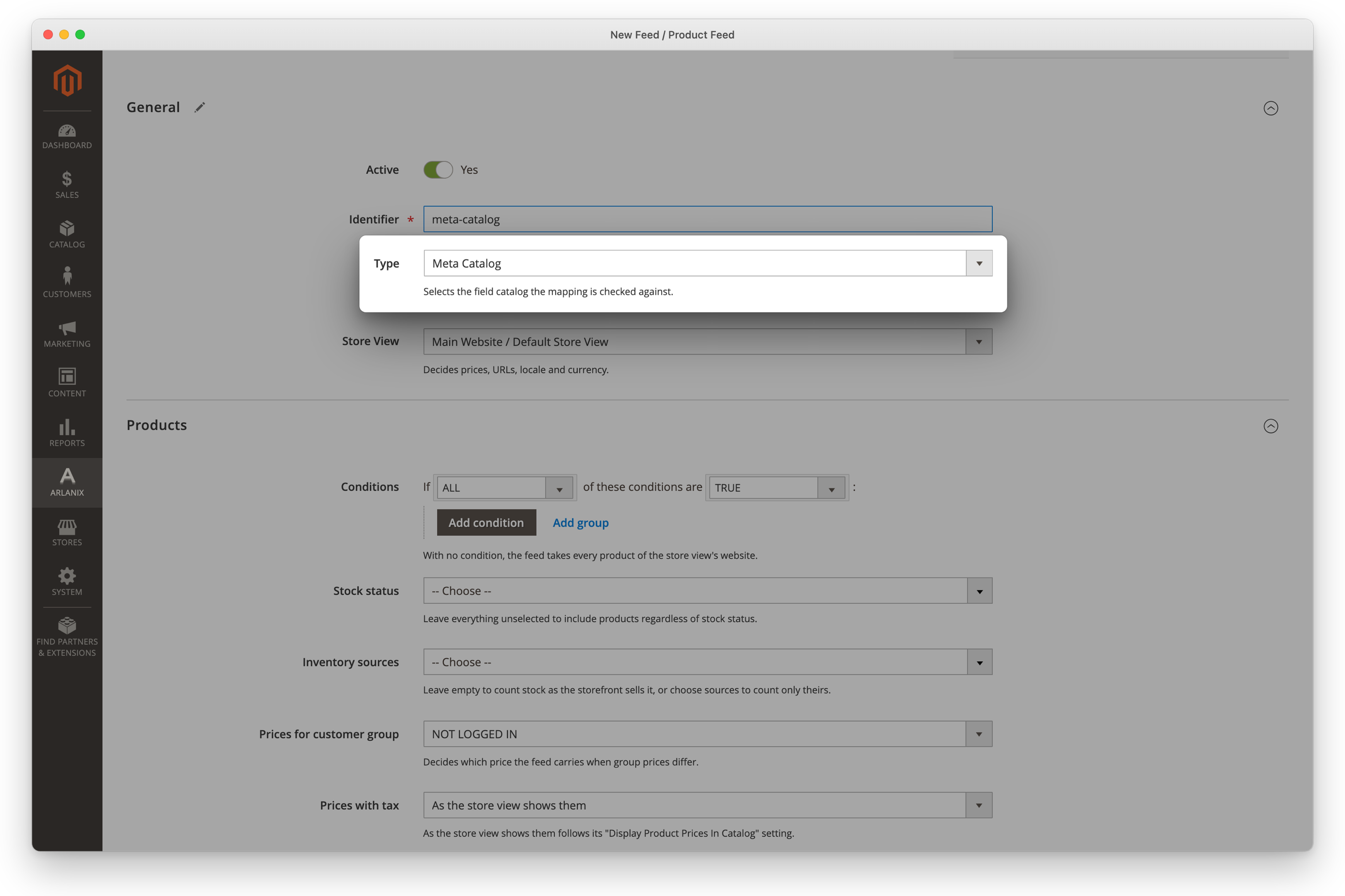
In Products, choose which products go in, as for any feed: for example, enabled products visible in the catalogue.
In Mapping, choose Meta Catalog under Copy from and click Copy. The rows arrive mapped: the SKU as
id, the name cut at 200 characters, the description without its HTML, the stock status in Meta's words, the price with its currency, and the product and image addresses.conditionarrives as the fixed value new: change it if you sell used or refurbished goods.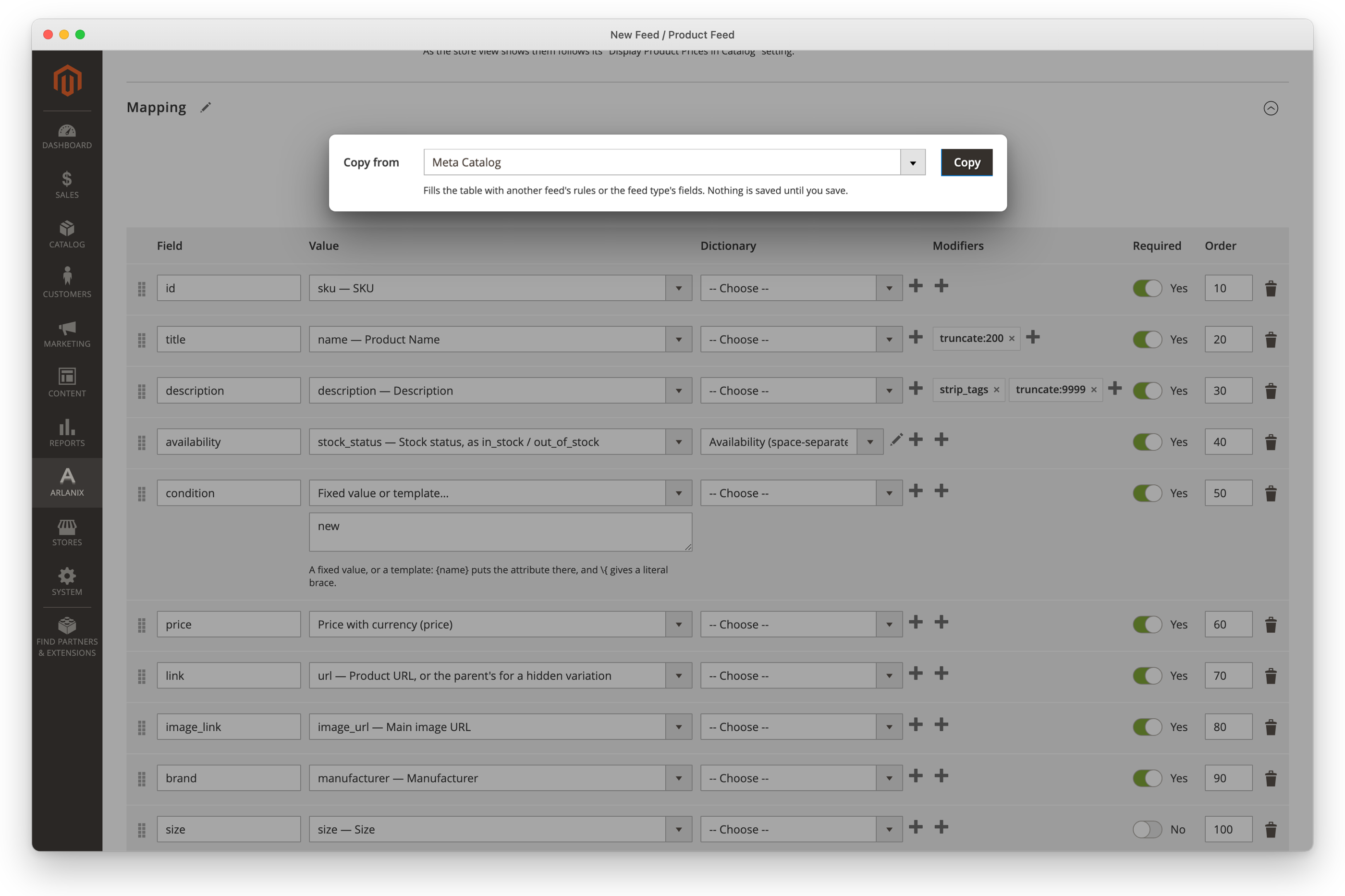
Check the brand row. It reads the manufacturer attribute; if your brands are in another attribute, choose that one. If you make your own products, choose Fixed value or template… and enter your shop's name, as the first step of the own brand recipe shows.
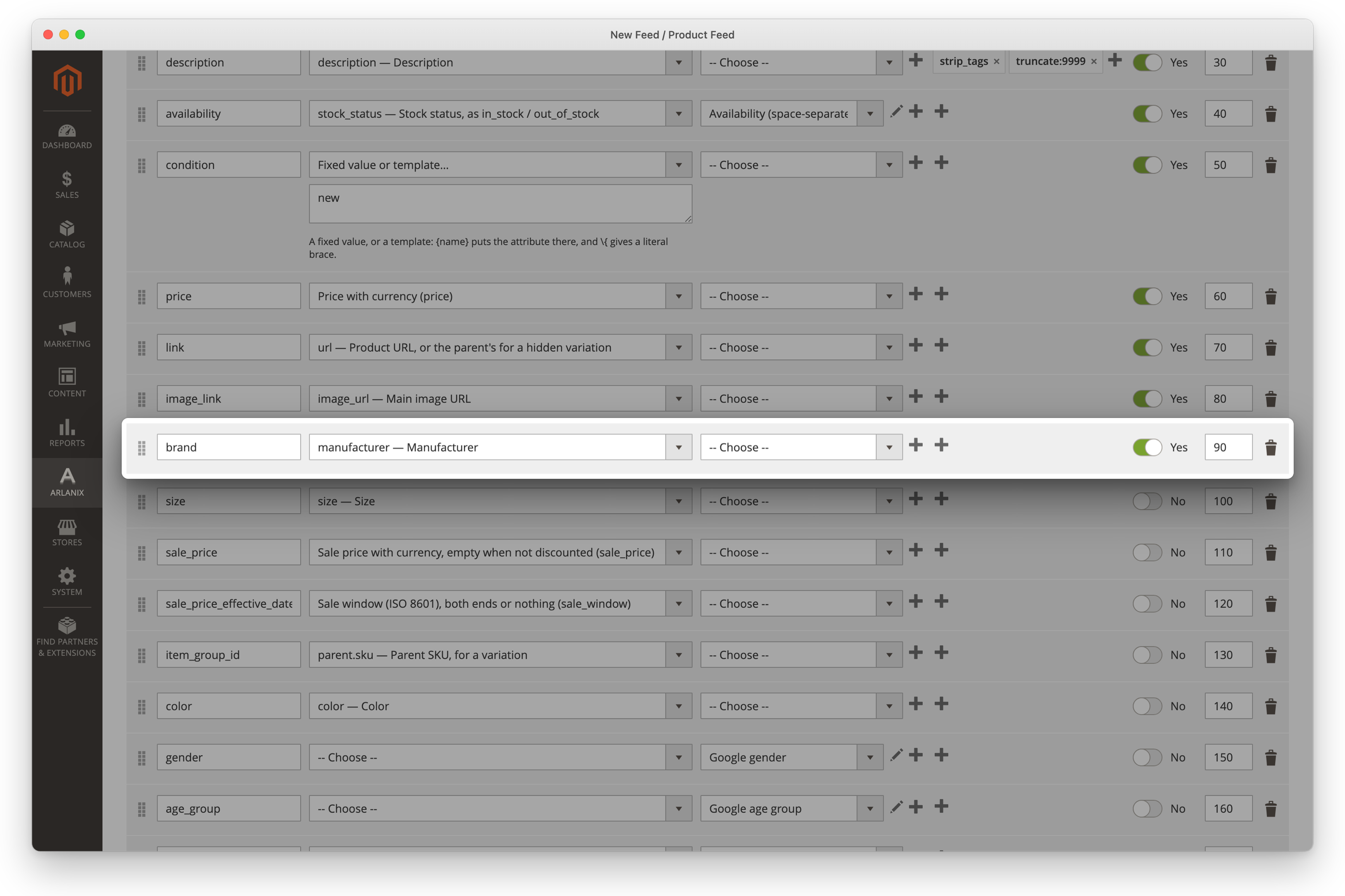
The rows below it are copied too.
sale_pricecarries the discounted price while a discount applies, and is empty otherwise.sale_price_effective_datecarries its dates only when the special price has both a start and an end date and today falls between them.In Channel, leave File and choose CSV. After you save, URL shows the file's address.
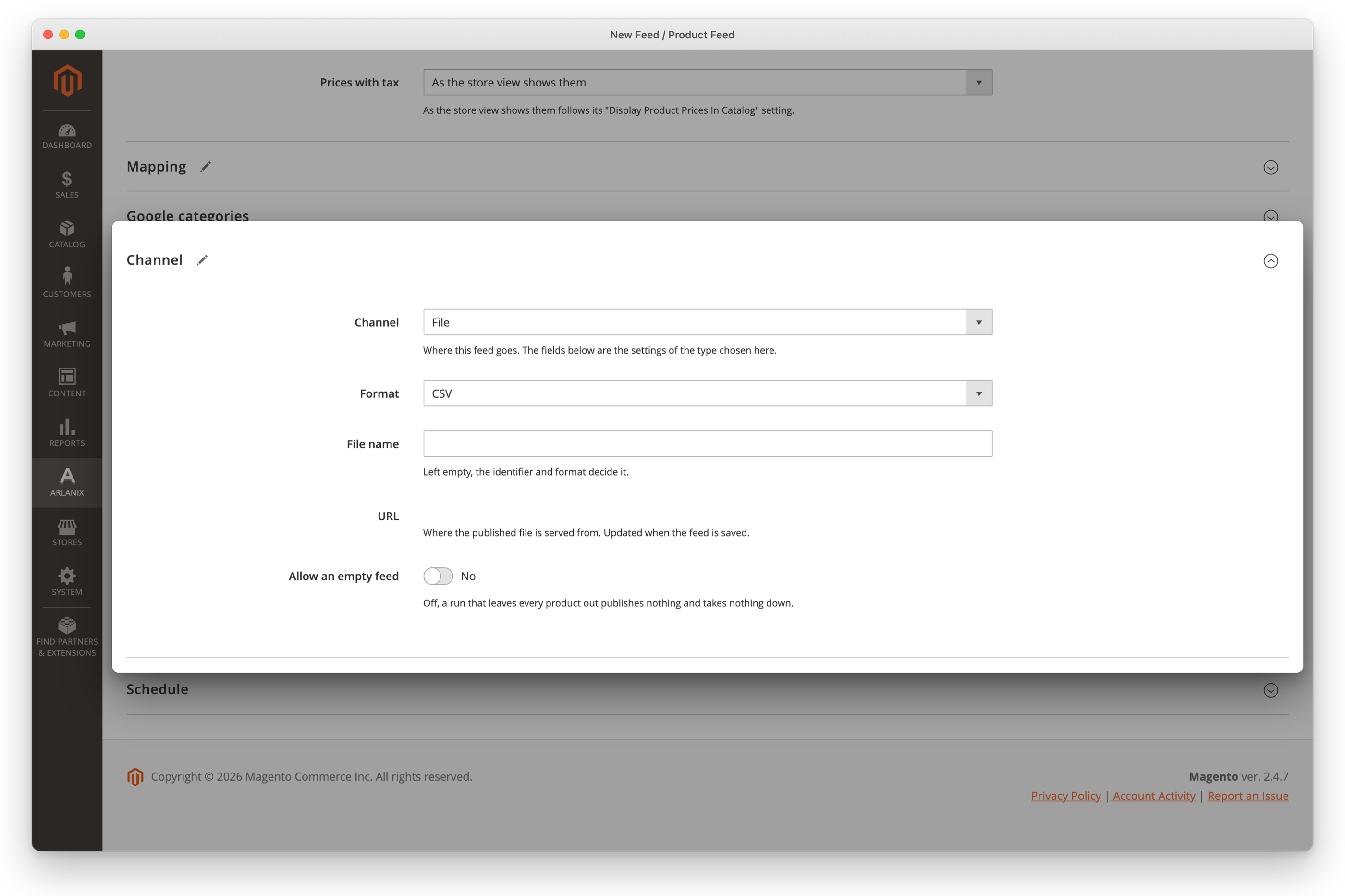
In Schedule, choose Every day at a quiet hour, such as 03:00. Next runs lists the times in the admin's time zone.
Click Save, then choose Select → Generate in the feed's row. The feed is queued, and the next cron pass generates it. A minute or two later, press Reload on the grid: Health shows the result, and File links to the file with its size. A failed run keeps the previous file, so check Health before you rely on what is there, then open the URL in a private browser window to see the file Meta will get.
To tell Meta's visits apart in Google Analytics, add utm_source=meta to the links, as Tracking parameters on links shows. To send each size and colour as its own item, follow Sizes and colours.
Add it in Commerce Manager
In Commerce Manager, open your catalogue, then Data sources → Add items → Data feed → Scheduled feed. Paste the feed's URL and choose how often and when Meta fetches it, such as daily at 04:00 for a feed that runs at 03:00. Meta's schedule has a time zone of its own: compare it with the feed's Next runs, so the fetch comes after the run and not before.
After each fetch, Commerce Manager shows how many products it took and the problems it found.
Which one to choose
| Meta's extension | A scheduled feed | |
|---|---|---|
| Catalogue | Synced by the extension | A file Meta fetches on its schedule |
| Fields | Its defaults, with its own attribute mapping | Every field mapped in the admin, with templates and dictionaries |
| Pixel and Conversions API | Yes | No: install Meta's extension or add them another way |
| Other platforms | Meta only | Google, TikTok, Pinterest, Snapchat and Microsoft too |
| Needs | Magento's Inventory modules, a Meta business account | A working cron |
| Where to get it | Adobe Commerce Marketplace or GitHub, from Meta | Adobe Commerce Marketplace |
For most stores that advertise on Meta, the extension is the first thing to try. A feed is worth it when you want one place for every platform's catalogue, a file you can check, or a store without the Inventory modules. Arlanix Product Feed runs on Magento Open Source 2.4.7 or later, with PHP 8.1 to 8.5 and a working cron.