Magento does much of its work in the background: order emails, indexing, price rules, the message queue. All of it starts from one line in the server's crontab. When that line stops working, the store keeps taking orders and the storefront looks fine, so nobody notices for days. Then a customer asks where their order email is, or a price change still hasn't reached the storefront.
How Magento's cron runs
Magento needs one crontab entry, which bin/magento cron:install writes for the user that runs the command:
#~ MAGENTO START 4d2f…
* * * * * /usr/bin/php8.1 /var/www/html/bin/magento cron:run | grep -v "Ran jobs by schedule" >> /var/www/html/var/log/magento.cron.log
#~ MAGENTO END 4d2f…
Run it as the user that owns the Magento files, usually the web server's user, not root. If the crontab already has this installation's entry, the command refuses; --force writes it again. The hash after MAGENTO START comes from the installation's folder, so an entry left from an old folder stays until you delete it.
Every minute, cron:run runs the jobs that are due. It plans them ahead into the cron_schedule table as pending rows, as often as Generate Schedules Every says for the group. Jobs come in groups, such as default, index and consumers. A row is running while its job runs and ends up success, error or missed. The settings for each group are in Stores > Settings > Configuration > Advanced > System > Cron (Scheduled Tasks).
What waits when cron stops
Nothing shows an error. Things just stop happening:
- Order emails, if Asynchronous sending is Enable under Stores > Settings > Configuration > Sales > Sales Emails > General Settings. The emails are then sent by a cron job, and none go out.
- Indexers in Update by Schedule mode. Price, stock and product changes reach the storefront when the
indexer_update_all_viewsjob runs, and invalid indexers are rebuilt byindexer_reindex_all_invalid. Both are cron jobs. In System > Tools > Index Management, the Schedule Status column shows the changes piling up, such as idle (2400 in backlog). - The message queue. The
consumers_runnerjob starts the consumers every minute. Without it, exports are not made, and Update attributes on several products at once does not apply. A store whose consumers run under supervisor instead keeps its queue moving. - Catalog price rules that start or end on a date. A nightly job,
catalogrule_apply_all, marks the rules' index for a rebuild, andindexer_reindex_all_invalidrebuilds it. - The newsletter queue, sitemaps and currency rates, when you schedule them.
Why it stops
The usual causes:
- The crontab is gone. The server was moved or rebuilt, or someone edited the crontab of another user. Magento's lines were never added back.
- The PHP path changed.
cron:installwrites the full path of the PHP that ran it, such as/usr/bin/php8.1. After PHP is upgraded and the old version removed, the line runs a program that no longer exists. - Cron is switched off in
app/etc/env.php. With'cron' => ['enabled' => 0],cron:runprints Cron is disabled. Jobs were not run. and does nothing. This is sometimes set during a deploy and forgotten. - A job hangs. Magento runs a job only once at a time. While one hangs, each later run of the same job writes Could not acquire lock for cron job: and the job's code to
var/log/cron.log, and its rows end upmissed. The other jobs still run, so cron looks alive.
How to check it by hand
As the user that owns the Magento files, run
crontab -land look for the lines between#~ MAGENTO STARTand#~ MAGENTO END.Check when jobs last ran:
SELECT job_code, status, scheduled_at, executed_at, finished_at, messages
FROM cron_schedule
ORDER BY executed_at DESC
LIMIT 20;
The times are in UTC. If the newest
executed_atis more than a few minutes old, cron is not running.messagesholds a failed job's error.Look for jobs that hang. A busy store runs many jobs a minute, so an old
runningrow drops out of the list above:SELECT job_code, executed_at FROM cron_schedule WHERE status = 'running' ORDER BY executed_at;A row that has been running for hours is a hanging job.
Copy the command from the crontab and run it yourself, as the same user. A PHP that no longer exists, a missing PHP extension or a permission problem shows up here.
Read
var/log/magento.cron.log, which gets whatcron:runprints, andvar/log/cron.log, which gets the errors of the jobs.
What Magento tells you
Nothing, as a rule. The admin has one message that mentions cron: One or more indexers are invalid. Make sure your Magento cron job is running. It appears only when an indexer is invalid. A stopped cron doesn't make indexers invalid; on Update by Schedule they just fall behind. So the message can stay away for days while cron is down, and someone has to open the admin to see it in any case.
Checking by hand works when you already suspect cron. To hear of it at once, something has to watch it.
Get a message when cron stops
Multichannel Store Notifications has a monitoring module with a Cron stopped event. It is sent when no cron job has run for 15 minutes, and a second message says when cron runs again. The setting Cron stopped after (minutes) changes the 15.
There is a catch in watching cron from inside the store: cron runs the store's checks, so a stopped cron can't report itself. The extension notices it in two other ways:
- An admin page. When someone opens a page in the admin, the store checks whether cron runs, at most once every five minutes.
- An uptime monitor outside the store, such as UptimeRobot or Pingdom, calling a health check address.
Either way, Cron stopped is sent at once, without the message queue, which also needs cron. So it reaches email, Slack, Telegram or Discord while cron is down.
Send it to a topic
Make a topic such as Store health and subscribe the people who look after the store. A chat such as Slack or Telegram suits this, because people read it at once. See Topics and Subscriptions.
Open Arlanix > Notifications > Rules and click Add rule.
Name it Cron stopped, choose the Event Cron stopped and the Topic Store health. It needs no condition.
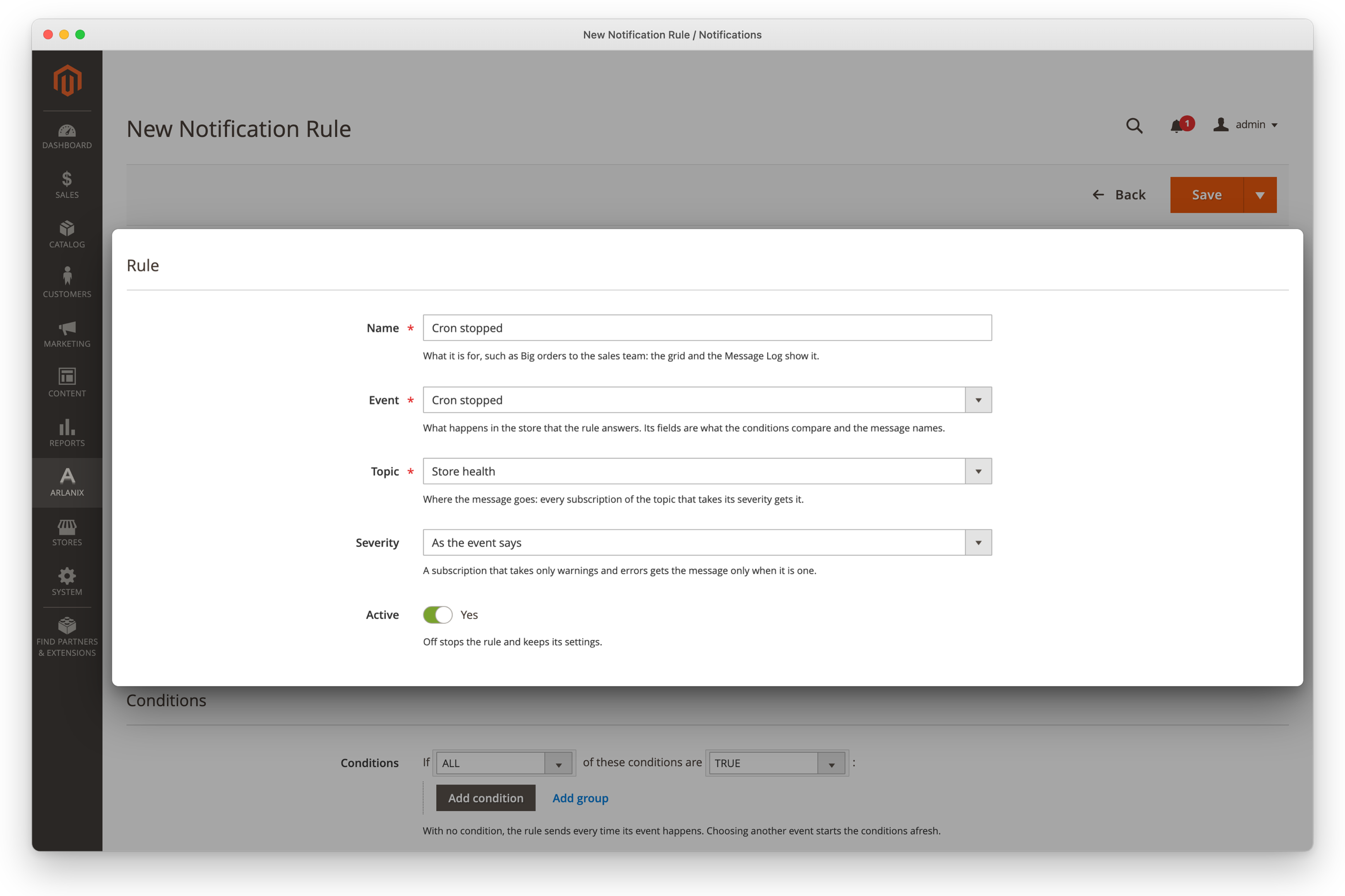
Click the arrow next to Save, then Save & Close.
Add a rule for Cron job failed in the same way. It names the jobs that ended in error, up to 50 at each check, every five minutes.
Point an uptime monitor at the store
Without a monitor, a stopped cron is noticed only when someone opens the admin. At night or on a weekend, that can be hours. With a monitor, it is noticed within minutes.
Open Stores > Configuration > Arlanix > Notifications and the Monitoring group.
Enter a Health check key, any long random text, and click Save Config.
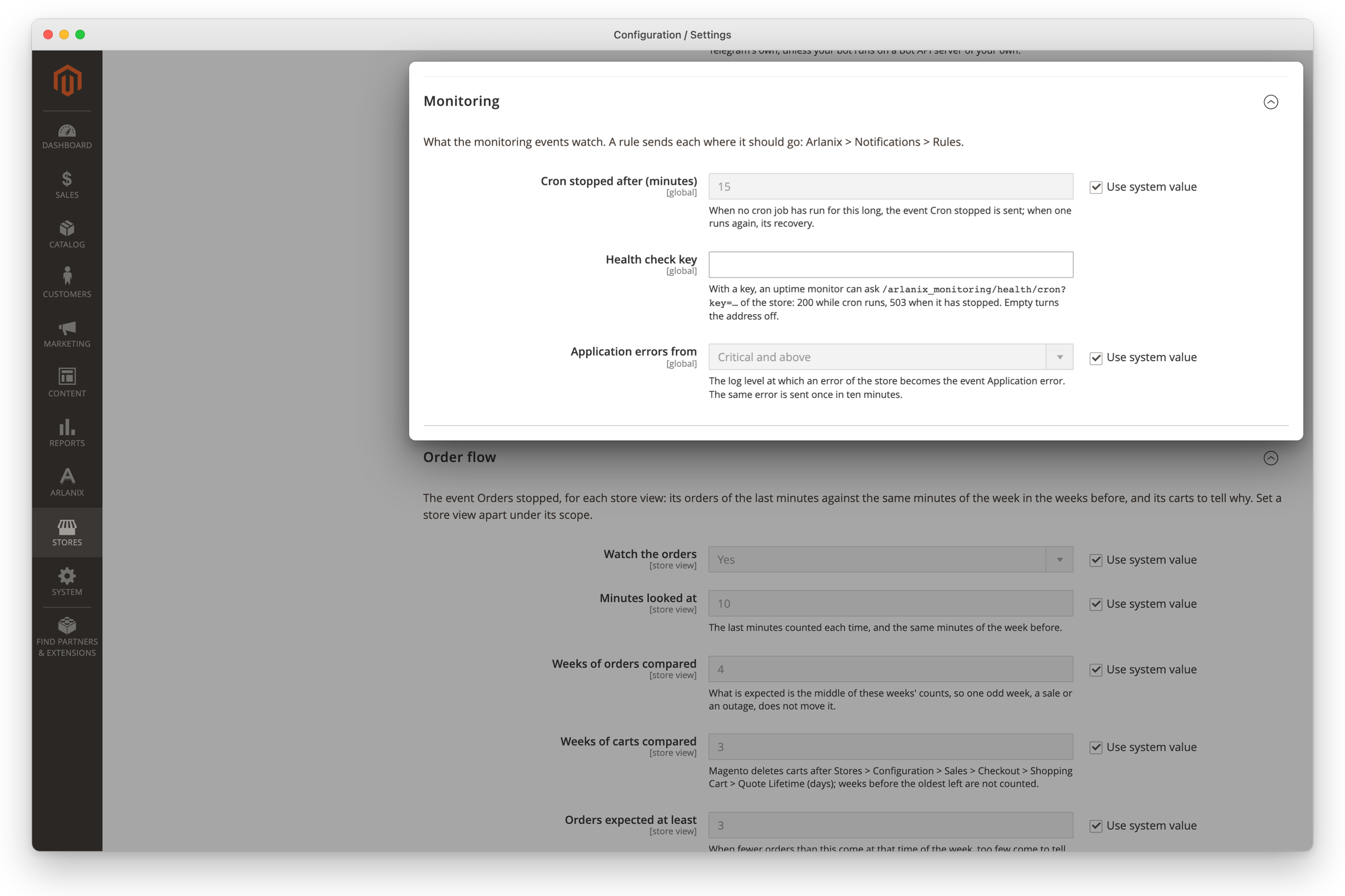
In your uptime monitor, add your store's address followed by
/arlanix_monitoring/health/cron?key=and the key.
The address answers 200 while cron runs and 503 when it has stopped, which the monitor reports as down. The request also sends Cron stopped, so you hear of it through the monitor and through your own channels. A new store answers 503 until cron has run once, and that sends nothing.
Before you rely on it, check a few things. If your URLs include a store code, add it to the address. If Varnish or the full-page cache caches by path, leave this address out of it. In maintenance mode Magento answers 503 to everything, so pause the monitor during deploys or allow its address with bin/magento maintenance:allow-ips. If a staging site sits behind a password, give the monitor the credentials. The health check in the developer docs has the details.
What it doesn't catch
Cron stopped looks at the newest job that ran in any group. If one job hangs while the others run, cron still counts as running. The hung job's later runs end up missed, not error, so Cron job failed doesn't report them either. The query for running rows above finds such a job.
Checking by hand or an alert
| Magento alone | Multichannel Store Notifications | |
|---|---|---|
| A stopped cron | Found when someone checks the server or the database | Cron stopped, from an admin page or an uptime monitor, and a message when it runs again |
| While nobody is in the admin | Nothing | An uptime monitor on the health check address |
| A job that ends in an error | A row in cron_schedule |
Cron job failed, naming the job |
| Where you hear of it | The admin, if an indexer goes invalid | Email, Slack, Telegram or Discord |
| Cost | Built into Magento | An extension from Adobe Commerce Marketplace |
Monitoring in the manual covers the other store health events: invalid indexers, errors in the log, and orders that stop. Multichannel Store Notifications runs on Magento Open Source or Adobe Commerce 2.4.7 or later, with PHP 8.1 to 8.5.