For arlanix/notification 1.1.0
The setting Stores > Configuration > Arlanix > Notifications > Email > Send through decides how email subscriptions are sent. It is set in the default scope only. It has two options:
| Option | Value of arlanix_notification/smtp/mailer |
How the email is sent |
|---|---|---|
| Magento's mail | magento (the default) |
Through Magento\Framework\Mail, the same way the store sends its order emails. |
| An SMTP server of its own | own |
Through Symfony Mailer, to the server you set in this group. The store's own mail settings do not matter. |
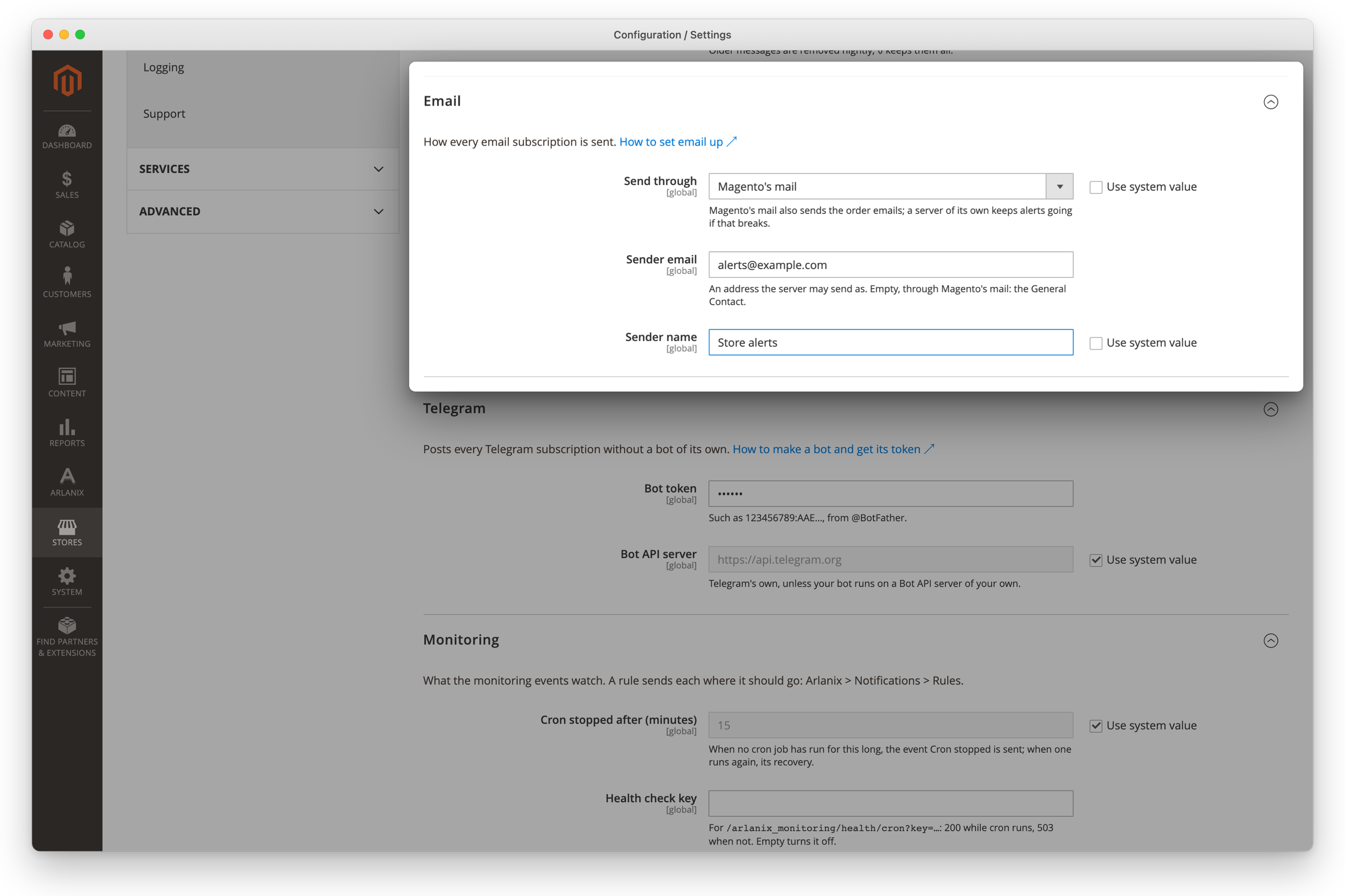
Magento's mail
With this option, the email goes through TransportInterfaceFactory. So it is sent by whatever sends the store's mail: sendmail or SMTP as set in Advanced > System > Mail Sending Settings, or a mail module that replaces the transport. You do not need to set anything else.
This option works as follows:
- The sender is Sender email and Sender name. When Sender email is empty, the store's General Contact (
trans_email/ident_general/*) is the sender. - Only the HTML part is sent, and the
Auto-SubmittedandX-Arlanix-*headers are not added. The reason is that Magento's message sends a text part and an HTML part side by side instead of as alternatives, and it does not accept extra headers. - When Disable Email Communications (
system/smtp/disable) is on, the module reports it before it tries to send. Otherwise Magento would drop the email without an error. - When sending fails, the delivery stores Magento could not send the email: … with the reason that Magento's transport gave.
An SMTP server of its own
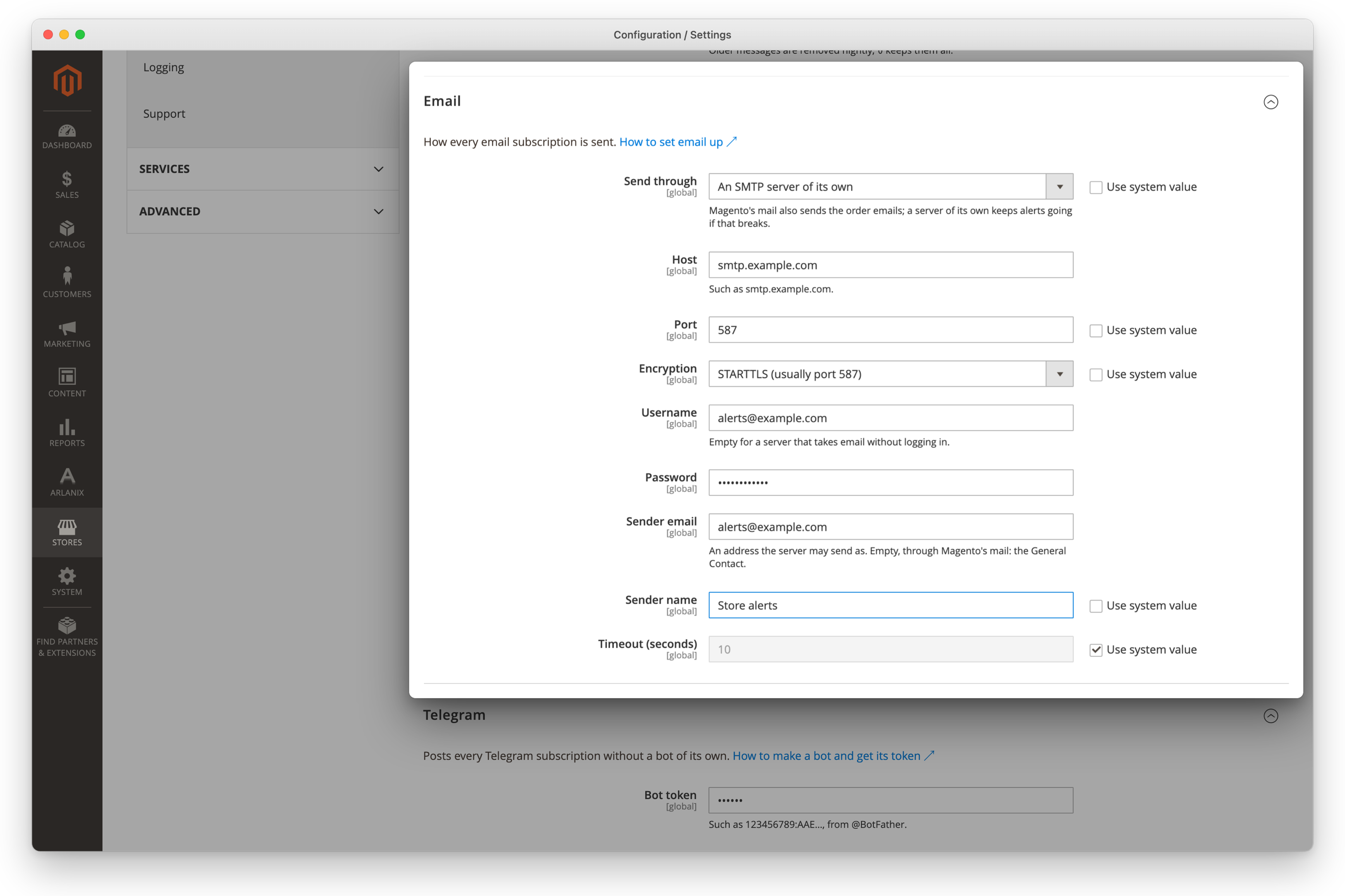
The following settings set up the server:
| Setting | Path | Default | Notes |
|---|---|---|---|
| Host | arlanix_notification/smtp/host |
For example, smtp.example.com. While it is empty, nothing is sent. |
|
| Port | arlanix_notification/smtp/port |
587 |
With 0, the mailer chooses the port: 465 with SSL/TLS, 25 otherwise. |
| Encryption | arlanix_notification/smtp/encryption |
tls |
See Encryption. |
| Username | arlanix_notification/smtp/username |
Leave it empty for a server that accepts email without a login. | |
| Password | arlanix_notification/smtp/password |
Stored encrypted. | |
| Sender email | arlanix_notification/smtp/from_email |
Required for this option. Use an address that the server is allowed to send as. | |
| Sender name | arlanix_notification/smtp/from_name |
Magento |
|
| Timeout (seconds) | arlanix_notification/smtp/timeout |
10 |
How long the server can take to answer. |
The server fields appear when Send through is An SMTP server of its own. Sender email and Sender name are shown for both options.
The username and the password are marked as sensitive, so app:config:dump does not export them. You can keep them in app/etc/env.php instead. The password must be encrypted there, in the same way that config:set --lock-env writes it.
To set up the server from the command line, run commands like the following:
bin/magento config:set arlanix_notification/smtp/mailer own
bin/magento config:set arlanix_notification/smtp/host smtp.example.com
bin/magento config:set arlanix_notification/smtp/username [email protected]
bin/magento config:set arlanix_notification/smtp/password 'app-password'
bin/magento config:set arlanix_notification/smtp/from_email [email protected]
Encryption
Encryption has three options:
- STARTTLS (
tls, usually port 587). The connection starts unencrypted and then switches to TLS. If the server does not offer STARTTLS, nothing is sent, and the delivery fails with does not offer STARTTLS. From Symfony Mailer 7.3, the mailer itself refuses such a server. In earlier versions, such as 6.4, which Magento 2.4.8 installs, the module checks the connection after it opens. - SSL/TLS (
ssl, usually port 465). The connection is encrypted from the start. - None (
none). Use it for a relay on the same network, such as a local Postfix or a test tool like Mailpit. In Symfony Mailer versions before 7.1, the mailer still switches to TLS when the server offers STARTTLS. So with those versions, sending fails if the relay's certificate is not trusted by the web server.
What is sent
Each email has the following:
- The sender from the settings, and the subscription's one address as the recipient.
- The header
Auto-Submitted: auto-generated, so that out-of-office replies are not sent back. The headersX-Arlanix-TopicandX-Arlanix-Severity, for mail filters. - A plain-text part and an HTML part with the same content.
Check it
There is no separate test button for email. Use Send test message on a subscription. It shows what the mail server answered.
Some problems stop email before anything is sent. The module reports them at once:
- Magento's mail is switched off.
- The separate server has no host.
- There is no sender email, or the sender email is not a valid email address.
A failed delivery stores what the server said, for example: The SMTP server smtp.example.com:587 did not take the email: Failed to authenticate on SMTP server with username "[email protected]" …. The message can contain the username, but never the password.